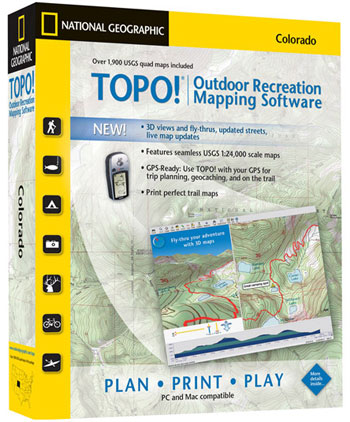
National Geographic Maps employs 60 full-time cartographers to produce publication supplements, atlases, globes, recreational maps and maps used for the society’s video and television productions. This division also produces TOPO! State Series software, a collection of digitized United States Geological Survey (USGS) maps packaged by state or region.
Essentially, the maps viewable in TOPO! are normal USGS quads that can be navigated and analyzed on a computer monitor. At the heart of this program are high-resolution scans of USGS maps in the standard 1:24,000 scale, all detail preserved from the originals.
But the digital format provides dozens of extra features not found on the paper copies, including topographical shading, three-dimensional views, distance and elevation tools, and GPS compatibility. Digital maps are seamless, as well, meaning you will never have to tape together two individual maps.
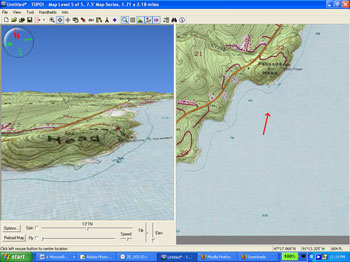
The latest version of TOPO!, which debuted earlier this year, has a few new features, including a “Fly-Thru” option that animates map data. After tracing a route on an onscreen map, users can right-click with the mouse and select the Fly-Thru option to enable a three-dimensional, videogame-like experience that flies the viewer through the virtual topographic terrain.
Fly-Thru is most effective for mountainous regions, where topographic lines are tight enough to cause canyon walls and cliff faces to pop off the screen. In this mode, users can look down a steep river valley or check out the view from an imposing mountain ridge to get a feel for the land before heading outdoors and into the real thing. For context, a split screen shows the two-dimensional map alongside the virtual bird’s-eye view, and you can stop anywhere along the fly route to zoom or pan 360 degrees.
Other new TOPO! features include live map updates via the Internet and highway and city street information.
The program has multiple layers of maps, from atlas-proportion 1:500,000 scale to the mid-range 1:100,000 maps, on down to the detailed 1:24,000 scale. You navigate by scrolling north, south, east or west from the atlas view before zooming in on a particular area as the program loads the higher-detail map.
Once your destination is centered on the screen, TOPO! provides dozens of tools to annotate, measure, analyze and plot your adventures. You can draw in routes and measure their distance and elevation gain. You can load GPS waypoints onto the screen. MapExchange, a free online service run by National Geographic, lets you download route data — like secret hot springs locations or the path of the Pacific Crest Trail near Mt. Whitney — from the Internet right onto your maps.
The program lets you print small areas or large swaths of geographic detail on any size printer. National Geographic sells waterproof, tear-resistant paper that works with inkjet and laser printers. It is called Adventure Paper, and it costs $20 for 25 sheets of 8.5 × 11-inch paper.
TOPO! State Series software (www.nationalgeographic.com/topo) costs $100 per program, which includes one or more states, depending on state size. It works on Windows and Macintosh computers. The software comes in packages of multiple CDs organized in a small plastic case.
In preparation for an upcoming adventure race, I tested the TOPO! software for West Virginia. I found the program to be fun and easy to use. Navigation of the maps and all basic operations was intuitive, and in no time at all I was virtually flying through Appalachia, scouting the course and hopefully getting a leg up on the competition.

