Review: Suunto T3c Sports Watch
March 13, 2010, 7:18 pm / Categories: Technology
By JOHN PEACOCK
As an on-again/off-again runner, this year I attempted to reboot my regimen with a heart-rate monitor watch. In the past, I’d tried an iPod-based system, but in the end I wanted more than the product could offer. (Knowing the type of song that sets a proper pace while I run only got me so far.) Thus, enter the Suunto T3c, a high-end sports watch with enough bells and whistles to (hopefully) motivate me to up the ante.
Most heart-rate (HR) monitor watches fall within a range of about $70 to $150. The cheaper ones provide your heart rate in beats-per-minute but tend to have few extra features, as would be expected. With the higher-end models, you get in-watch tools to track training or software-based methods to compare data from workout to workout on a computer. At about $120, the Suunto T3c, a watch I have now tested over the past few months, is one of those higher-end models.
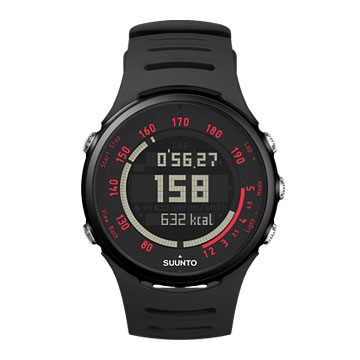
The Suunto watch was easy to use, with well-labeled buttons indicating the expected features to find within. For example, it was easy to “record” a new workout to track splits, heart rate and other data — you just push one button to start it. My beats-per-minute heart rate was displayed in big numbers on the watch face as I ran.
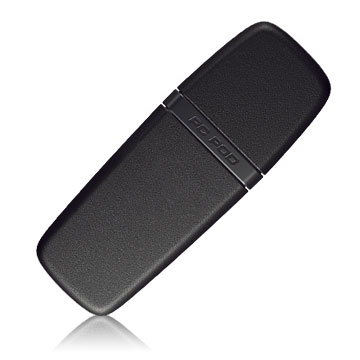
In all, the T3c package came with the watch, an HR chest strap, a “quick start” manual, a full manual, and a warranty booklet. What’s missing? There was no software and no way to connect the watch to my computer. Indeed, to connect to a PC computer — Apple users take note: it’s not Mac-compatible! — I had to buy a USB device called the PC POD, which costs about $90.
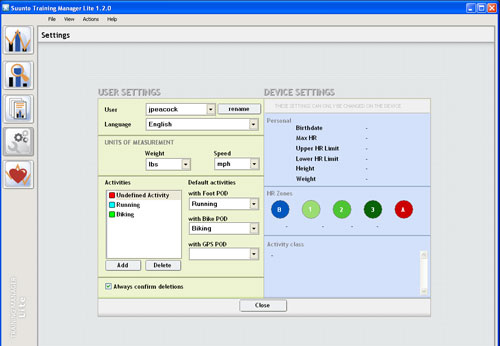
I ordered the PC POD, which came with Suunto’s Training Manager Lite software. After a run, I would download data from my workout to a computer. I’m somewhat of a data junkie, so being able to pick apart workouts was right up my alley. The Training Manager program displayed timed splits, heart-rate peaks and valleys, and total workout times. You can view your workout via charts and graphs.
From my experience with the Nike+ system, I was hoping that Training Manager Lite would offer a similar setup. But Suunto’s software isn’t as straightforward or as easy on the eyes as Nike+. The leg up that Nike+ has is that it’s dead-simple to understand. Suunto has more built-in features as well as a “live monitoring” functionality that allows for multiple users to participate in an analysis.
In use, I had a couple gripes with the watch. To start, the watch face display is slightly dim. It was bright enough during outdoor workouts. But for my workouts inside, the contrast was too low, resulting in a need to twist my wrist to see the watch face straight on.
Another sore point: As a Mac owner, I’m hoping the company’s future software will work on my Apple laptop. (As noted, the program is Windows-only for now.) Perhaps Suunto’s upcoming foray into Web-based software, which it previewed at a trade show in January, will bring that change.
Overall, the T3c was a nice addition to my workouts. With the added cost of the PC POD, the package was more than $210 — not cheap! But simply being able to see the results of my run — and track my workouts precisely onscreen at home — has given me extra motivation. I still use my iPod when I run. But the HR tracking on the Suunto gives me a numerical goal to reach for each time I head out, rather than just trying to keep running for 10 songs straight.
—John Peacock is a founding partner of GearJunkie.com.
There’s a 3rd-party piece of software that can be used to sync up the T3c on my Mac, iSmartTrain it’s another $50, so all in, you’re paying about $250 to get a watch to just sync up with a computer. I seriously don’t know why ANY of these companies couldn’t just do a Bluetooth watch that lets you import your workout into a web app. Suunto mentioned a web app replacement at this last Outdoor Retailer show, but that might only provide 50% of the solution.
I still don’t know how anyone would want to spend this kind of money when they could get the Garmin Forerunner 50. It cost me $50 with the foot pod and wireless USB uplink dealy. The foot pod keeps track of my cadence, distance, speed, etc. It does intervals too. I added a HR monitor for $25. Training center from garmin works with their GPS watches or with the Forerunner 50. Shows graphs of HR and speed etc. The best part is it links up with www.runningahead.com
I love that site!
Even if you buy the Forerunner 305 you’re doing better than this Suunto as far as price goes and you get GPS on top of HR.
I just don’t understand how the Forerunner 50 is so cheap for what I get out of it. No i don’t work for them. Just love my Garmin. I wear it every day because it’s not bulky like the 305 and 205.
just wondering where you got the Forerunner 50 for $50? Checking Amazon got me about $190…? http://amazon.com/s/ref
- Weekly E-Newsletter
Sign up for our e-news for a weekly update on new gear, adventure travel, and prize giveaways.
- Latest Articles
- 10 'dirtbag' climbers convert vans into mobile homes
- $15k Prize Pot brings Olympians, National Champs to Mountain Games MTB
- 'Sexy Bodies, Naughty Words' are Hallmarks in Pearl Izumi Campaigns
- 100+ Years as 'Adventure Equipment' (yes, the Thermos)
- Shoelace of the Future? Tour of Boa Technology in Denver
- 100 Miles of Twisting, Climbing, Gravel Road Biking at Almanzo Race
- Hot or Cold? Thermos 'Travel Tumbler' Test
- Video: 'Gear Junkie Challenge" Urban Adventure Race
- Winners! 'Ragnar Trail' Sweepstakes with Salomon
- 'Pro-Level' Air Attack Helmet Put to Test
- Popular Articles
- 'Sexy Bodies, Naughty Words' are Hallmarks in Pearl Izumi Campaigns
- 10 'dirtbag' climbers convert vans into mobile homes
- 100 Years as 'Adventure Equipment' (yes, the Thermos)
- World's 10 Most Dangerous Mountains
- Survival Gear: 10 Items To Survive
- 'Pro-Level' Air Attack Helmet Put to Test
- 100 Miles of Twisting, Climbing, Gravel Road Biking at Almanzo Race
- Camping Gear Reviews | Gear Reviews
- Climber makes couch out of old rope (and 9 other odd uses)
- 'Fat Bike' Trend: Overrated or For Real?
- Workout Wear
- You’re Grounded! 'Earthing Sandals' Provide Electrical Link To Planet
- First Look: Suunto 'Ambit 2' for multisport market
- Shoelace of the Future? Tour of Boa Technology in Denver
- Chimney Stove: Boil Water with Sticks and Grass
- Fat Bike trend Dead? Walmart sells 'Beast' bike for $199
- Hot or Cold? Thermos 'Travel Tumbler' Test
- SylvanSport GO Camper Trailer Review
- 10 Rules: Running with your Dog
- First Look: Bear Grylls unveils line of Camping gear
- Friends of Gear Junkie
- Monopoint Media
- The Goat
- Alpinist
- Adventure Blog
- YogaSlackers
- Checkpoint Tracker
- Outdoorzy
- Get Outdoors
- Gear Flogger
- Feed The Habit
- Gear.com
- Adventure Journal
- SuperTopo
- Trailspace
- Outside Online
- iRunFar.com
- UpADowna
- About Adventure Travel
- Cold Splinters
- UpNorthica
- Sender Films
- Venture There
- Wend Magazine
- No Boundaries
- Breathe Magazine
- Elevation Outdoors
- Rock and Ice Magazine
- Trail Runner Magazine
- REI Blog


The whole non-Mac friendly software thing is getting on my nerves. Polar plays the same game and it’s really getting old. I’ve now had several Suunto and Polar watches that I’ve been unable to use to their full extent because of it. The whole VMWare purchase, load XP dance all just to use my watch!?! Irks me.