I own multiple boats and run different electronics from all the major brands on them. This year, when I purchased a fishing pontoon for larger fishing groups, I decided to mount a Humminbird XPLORE fish finder on the console. For me, it was a bit of a litmus test, and I wanted to see if it would be worth switching all of my boats over to Humminbird units, at least at the consoles.
I spent months testing it and had a review pretty much wrapped up, until a merge with Minn Kota threw a wrench in my plans. Minn Kota discontinued the XPLORE and replaced it with the Minn Kota X Series.
But after a bit of research, I learned that they are, in fact, the same fish finder from a hardware standpoint. With a software update, the XPLORE effectively turns into the X-Series with all new, never-before-seen features. I updated my XPLORE and got back on the water to test the “new” graph in its entirety.
In short: It is nearly impossible to say one fish finder is the best out there. Too many features make side-by-side comparisons difficult, and while one brand may excel in one area, it often struggles in others. That being said, the Humminbird XPLORE is, in my opinion, the most well-rounded unit out there, and it’s become my favorite fish finder on the consoles of all of my boats. Improved connectivity with Minn Kota trolling motors makes it, and the X-Series, one of the most complete marine electronic packages on the market.
Humminbird XPLORE Fish Finder Review
Specifications
Pros & Cons
Pros
- The best mapping in the game
- Excellent side and down imaging
- Fantastic connectivity with Minn Kota trolling motors
- Easy user interface
- Lighting fast processor
- Excellent pricing, especially for FFS transducer
Cons
- There are better forward-facing sonar units out there
- Have to stay up to date on updates
- Need a Minn Kota trolling motor to access all features
Recent Free Update Unlocks Handy Features

Let’s start with the new. The latest software update, officially called version 7.400 (though I’ve dubbed it the X Series update), gives anglers improved connectivity with Minn Kota trolling motors. So the update only matters if you have a Minn Kota trolling motor on your boat. If you have a different-brand motor, it won’t do you any good, but it may leave you wanting to buy a new one.
Here’s my experience downloading the new X Series software onto my XPLORE, and how the new features performed.
Installing Updates on the Humminbird XPLORE
If you’ve been good about keeping your software updated, upgrading to version 7.400 should be quick and painless. However, if you don’t have version 6.120 installed, you will need to do multiple updates to reach the latest version, which is what I had to do.
You can update your software with an SD card, a WiFi connection on the graph itself, or in the Minn Kota app on your phone paired to the graph via Bluetooth. For testing, I tried all of the options. I would recommend the SD card. The estimated times were so long via the other options that I stopped trying. The SD card is lightning fast and the best option by a mile.
Once I got my XPLORE running on version 7.400, I realized the updating didn’t stop there. I have a Minn Kota Terrova Quest mounted on my bow, and the new functionality also requires a software update for the motor.
Since I couldn’t plug an SD card into it, I updated my motor via the Minn Kota app. It took some time, but it wasn’t terrible. Once I got the Terrova Quest updated, I was able to connect it to the fish finder wirelessly. Overall, the updates are a bit of a process and take some time, but they’re pretty straightforward.
Why Wireless Connectivity Matters: Draw to Navigate

Connecting the XPLORE wirelessly to the trolling motor allows anglers to use Minn Kota’s new “draw to navigate” feature. With that, you can draw a line on your map, and your trolling motor will follow that exact path without you having to use the foot pedal or remote.
At first, I wasn’t sure if I would use it much. After all, anglers have been running trolling motors for years, and it becomes second nature while you’re fishing. Then I tried it, and let me tell you what: it’s awesome.
Multiple times throughout the day, I set a path, set the trolling motor speed on the XPLORE screen, and fished without thinking about the trolling motor. You can completely, one hundred percent, focus on fishing. It was way more freeing than I expected.
I also liked it when moving from waypoint to waypoint. A few locations I fish are too close together to hop on the big motor, but require some time on the trolling motor. Instead of steering to the next spot, I could drop a line and let the boat navigate there. Since I was completely distraction-free, I could use that time between spots to re-rig rods, so I was ready to go as soon as I hit the next structure. Once the motor reaches the destination, spot lock automatically engages.
It went from something I didn’t expect to use to something I use every time I get on the water.
Shallow Water Detection Keeps You Safe

The update also includes a shallow water blocking feature. Essentially, if your motor gets too close to shallow-water obstacles, it will stop itself before hitting them. On three occasions, I tried to set a path that would run my trolling motor directly into rocks just beneath the surface. All three times, it stopped me before hitting them.
Now, that feature requires some initial setup, and I won’t go into it here. When you connect the trolling motor to the fish finder, it will walk you through the entire process step by step, and its pretty darn easy.
Overall, these upgrades make for a better experience on the water. It’s all about increased efficiency and more focus on fishing.
Using The Humminbird XPLORE to Locate and Catch Fish

I love the new updates, and they’re nothing but a win in my book. But how does the unit perform in the main task of a graph, i.e., finding and assisting in catching fish? As a fishing guide, it’s become one of the most vital pieces of equipment I own. The graph allows me to use a three-step, “macro to micro” approach to locate and catch fish.
Mapping
My approach starts with the mapping. The XPLORE comes with a Lake Master chip, and it is phenomenal. It has an extreme level of detail that shows every nook and cranny on virtually any body of water. Honestly, compared to my Lowrance and Garmin units, the Humminbird XPLORE has the best mapping.
Other maps tend to be a bit confusing and cluttered. However, Lake Master shows everything without being distracting or over the top, and there is no glitchiness when scrolling on the map or when my boat is on plane. Beyond LakeMaster’s detail, I really appreciate two mapping features on the XPLORE.
The first is the “water level offset.” My home body of water is Percy Priest Lake, a dammed river system known for eating outboards, and its levels change throughout the year. The water-level offset function lets me set the lake level to its current real-time level, and the map contours and depths adjust accordingly. It keeps me and my boat safe, no matter the water level.
Even handier is the depth highlight function, which I use constantly. Here’s a scenario: let’s say I’m having a tough day, but I start catching fish on flats of 6-10 feet deep, butting up next to 18- 25-foot-deep river channels.
I can go into the settings and highlight 6-10-foot depths one color, and depths of 18-25 feet another color. Then, if I zoom out and view the lake in it’s entirety, those spots stand out like a sore thumb. In an instant, I’ve turned a giant lake into very specific locations to drive to and check out.
Down and Side Imaging with the Humminbird XPLORE

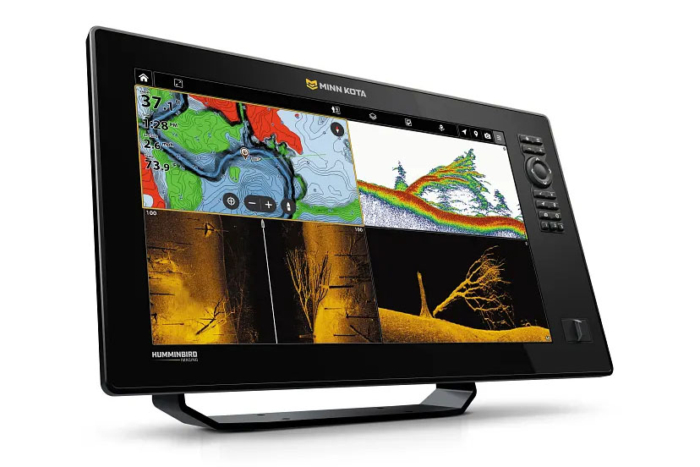
Once I have key areas located throughout the lake, I utilize down and side imaging to hone in on individual structure. I roll into zones, split the screen of the XPLORE to display both side and down imaging, and idle through likely areas I already identified.
Humminbird/Minn Kota’s side imaging is fantastic. Even out to 90 feet, it shows detail with excellent separation. It’s easy to identify rock piles, stumps, and submerged brush piles in the zones I marked on my map. The image quality is highly impressive.
When I idle past and identify such structure, the XPLORE touch screen allows me to mark it with a waypoint. While still idling, you can press and hold on the image of the structure on the screen, and then a cursor will pop up prompting you to build a waypoint. That will build the waypoint on that exact structure, rather than on your boat’s position.
In a short time of idling, I’ll have identified multiple precise locations, now stored as waypoints, to target in key areas. I can then hop on the trolling motor in that area and bounce from waypoint to waypoint, knowing I’m targeting nothing but prime areas.

Humminbird Mega Live 2

The final piece of the puzzle is dialing in fish behavior on the exact spots I have marked. That’s where Mega Live 2 comes in. Since forward-facing sonar is such a big topic nowadays, I’ll take a bit more time describing how it performs compared to the competition.
With any bit of online research, you’ll quickly discover that most anglers are in agreement that Garmin LiveScope is superior to Humminbird MegaLive 2. I have both, and I would agree, but that statement deserves a bit more explanation than simply “Garmin is better.”
When it comes to forward-facing sonar, Garmin LiveScope is better because it’s a bit more “crisp” an image than MegaLive 2. There’s better definition of structure, better separation of fish, and I’ve found it’s easier to see small baits.
On the flip side, Mega Live 2 is more prone to noise. I have to tweak the settings more to get a clean screen that lets me easily identify and watch fish. Many times, when I get that clean screen, it becomes difficult to find my bait, so I have to adjust more. It seems like there is a fine line to get it dialed perfectly. That is also true of Garmin LiveScope, but that magical window seems bigger with LiveScope than Mega Live 2.
Now, that being said, after messing with both, I think the difference between the two is overstated. Functionally, Mega Live 2 is an effective forward-facing sonar. Using it, I can track my bait, watch fish eat it, and dial in fish behavior effectively — and I think most anglers will be happy with it.
What Makes the Humminbird XPLORE Stand Out from the Competition
Those features aren’t unique to Humminbird, and both Garmin and Lowrance offer similar fish-finding capabilities. Two things, however, make the Humminbird XPLORE really stand out.
User Interface
Marine electronics are intimidating. Although I’m relatively young, I am not super tech-savvy. Yet I found setting up and adjusting my Humminbird XPLORE extremely easy. The user interface is ridiculously simple, and I find it easier to use than my Lowrance and Garmin units.
Intuitive best describes it. Every feature and every setting adjustment is exactly where it should be. Without watching any instructional videos or reading any manuals, I was able to locate all of the impressive power and features of the XPLORE. If I didn’t know how to access something, I’d find myself thinking, “I’d imagine it would be under this menu,” and bingo, that’s exactly where it would be. There isn’t a lot of noise or chaos, just easy, immediate access to settings and features you need.
Much of that comes from the touch screen, a major upgrade over the HELIX units the XPLORE replaced. It’s easy to click around on screen, rather than pressing random buttons to access menus. But if you’re not a touchscreen guy, you can still use the buttons on the right side of the unit to access everything, though I think if you try using the touchscreen, you won’t go back.
You can also customize your display options for quick access to certain screens and create shortcuts to features you use the most. I was surprised at how much I’ve used the customization, and it was easy to set up, too. At the end of the day, it keeps me fishing rather than clicking through a bunch of menus and screens.
Pricing of the Humminbird XPLORE
In the world of units with side/down imaging, boat networking capability, and forward-facing sonar compatibility, it’s tough to find a better deal than the Humminbird XPLORE and the new Minn Kota X Series.
That’s especially true of the XPLORE. Remember, it’s the same unit as the new X Series, and since it’s being discontinued, you can easily find one on sale. Units are currently for sale for $1,100- $2,400, depending on screen size and whether it includes a transducer. In my opinion, it’s one of the best deals you can find in marine electronics right now. Even if you don’t buy in time to capitalize on the Humminbird deals, at full price, the X-series ($1,200-$4,000 for models including the transducer) is still a bargain.
The XPLORE/X-Series is the cheapest graph in the brand’s lineup that gives you access to all of the features Minn Kota offers. With it, you get all the power of the best units out there, without the price. Yes, you can buy more expensive graphs, but functionally, you don’t gain much in performance. You’ll find higher resolution and additional ports, but that’s about it. Personally, I would recommend spending more money by going up in screen size on an XPLORE/X-Series, rather than buying a “better unit” in the same size.
Compared to the competition, the XPLORE is especially attractive if you want a forward-facing sonar transducer. MegaLive 2 will run you $1,599.00 retail. In comparison, Lowrance’s Active Target 2 XL with a black box (not required with MegaLive 2) costs $1,849.99, and Garmin’s LiveScope 2 HD LVS42HD is $2,199.99. Yes, older-generation Garmin LiveScope transducers are still for sale, but those are still a few hundred dollars more than the MegaLive 2.
Final Thoughts: If I Were Rigging a Boat, Would I Run Humminbird, or Something Else?

I really dig these fish finders because they make my time on the water easier and help me solve the puzzle that is fishing. The Humminbird mapping is the best I’ve used; the side and down imaging is possibly the best I’ve used, and the graph now has surprisingly nifty upgraded features when paired with a Minn Kota trolling motor.
I also haven’t mentioned the processor yet. It’s lightning fast. I often run it with a split screen, with maps, side imaging, and 2D sonar running at once. I can zoom in and out on maps rapidly while running those other tools at the same time, with no delays whatsoever. It works so well that I think people often overlook it because it does its job flawlessly. Not all fish finders do that.
That said, if money were no object and I were buying a unit for the bow of my boat solely for forward-facing sonar, I would lean toward a Garmin. But if money were an object, as it so often is, I would have no issue relying on Humminbird MegaLive 2.
When it comes to console units, however, I think the XPLORE/X-series is a no-brainer. With its simple user interface, it’s my favorite console unit. I would recommend it ten times over. If you can find an “old” Humminbird XPLORE on sale, jump on it while you can. If not, I wouldn’t blink twice at paying full retail for the new X-Series.