For people who live and/or travel remotely in their vehicles, communication can be tricky, but it’s still vital. Where cell signals don’t reach, most people rely on GMRS (General Mobile Radio Service) radios mounted in their rigs. Back in high school, we relied on these radios in our trucks to find the next party in the woods. Now I rely on them to find out what’s going on around me, since where I live it’s easier to take a fire trail or forest road to get where I’m going than it is to take a paved road.
The issue with vehicle-specific GMRS radios is that new vehicles aren’t designed with much room to mount them – at least not anywhere convenient. In most cases, you need access to both the receiver and its transmitter/handset, which needs a place to be mounted. Then there’s the cable that connects the two, which always seems to get in the way and keeps you tethered inside your vehicle.
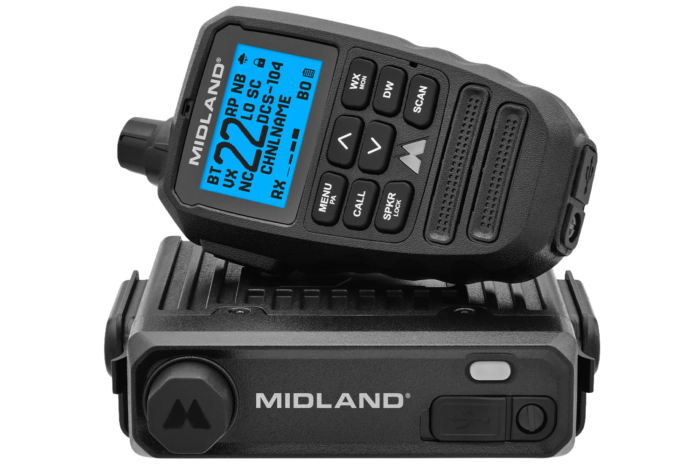
Last month, Midland addressed these issues with the launch of its MXT295 PRO 15W MicroMobile GMRS Two-Way Radio ($300). As part of their MicroMobile line, the MXT295 PRO receiver is small, and in this case, it can be mounted anywhere in your vehicle. This is because you control the unit entirely by the handset, and the handset is also Bluetooth. So, not only do you not have to deal with a cable swinging around in your rig, but you don’t need to stay in your rig to use the radio.
In short: If you’re someone who takes their rig out on remote trails, either alone or in a group, communication is a crucial part of a successful journey. The Midland MXT295 PRO makes installation, setup, and use easy and enjoyable by eliminating wires and letting you roam with the handset instead of being tethered to a box on your dashboard.
Specifications
Pros & Cons
Pros
- Wireless
- Easy to install
- IP67 waterproof and dustproof rating
- Large readout with multiple colors and brightness levels
- Can be used while charging
Cons
- You’re not going to be able to get “East Bound and Down” by Jerry Reed out of your head for about a month
Midland MXT295 PRO 2-Way 15 Watt GMRS Radio Review
Design & Features

Like the rest of the Midland MicroMobile line, the MXT295 PRO is compact and durable. However, the MXT295 PRO is IP67-rated against dust and water, meaning you can spill your Red Bull on it in a rainstorm and not have to worry about more than having sticky mitts. The handset is also wireless, letting you move freely up to 100 feet in any direction around your vehicle while using it. It has a battery life of roughly 60 hours, can be used while charging, and recharges from dead in 4 hours.
In the box, you’ll get the receiver, the wireless Bluetooth handset, a 2.1 dB antenna with an attached cable and magnetic base, a slide-in receiver mount, a 12V power cord, a USB-C handset charging cable, and a magnetic handset mount. This is quite literally everything you’ll need to get up and running.
The handset is your information station. It has a large channel readout, plus a series of symbols and images that indicate function, status, and more. The color of the screen can be changed, and its brightness can be dimmed to be used day or night. Additionally, all control buttons on the MXT295 PRO are on the handset, unlike many other radios where you need to access functions on the radio body itself.
First Impressions

I used Midland’s 75-822 Mobile CB Radio for nearly a decade in my old, 4th-Gen Toyota 4Runner. The beauty of that system is that it lets you connect to a larger antenna mounted to your vehicle, or use it remotely with a smaller antenna and battery pack. The MXT295 PRO gives the same untethered feel, but it manages it differently.
Going from CB (Citizens Band) to GMRS (General Mobile Radio Service) is like night and day. First, a GMRS radio’s clarity matches a cellphone. Even the NOAA weather band channels are crisp – making that robotic banter even easier to digest.
As for the Midland unit itself, the receiver is about the size of a few stacked CD cases (remember those?), but built like a brick shithouse. I plan on tucking it into my center console, as there is a power outlet in there, but for people on side-by-sides, for example, where it will likely be bumped around a fair bit, give it hell. The fact that the entire MXT295 PRO can be exposed to the elements is a real boon, too.
Licensing
The FCC requires that any radio on the GMRS frequency that transmits at 2 watts or more needs to be licensed. I had to do this when I picked up my Rocky Talkie Expedition Radio, as it transmits at 5 watts. The process is easy and requires no testing. You just pay $35, and you’re good to go for a decade. You do need to be at least 18, though, so if you’re thinking of putting one in your kid’s rig, that could be an issue.
Midland does a great job explaining the regulations and walks you through the process.
Major Upgrades

Midland based the MXT295 PRO on their MXT275. Both are MicroMobile units, so they’re compact and easy to mount once you find the perfect spot. Beyond the Bluetooth handset, the MXT295 PRO includes several upgrades based on consumer feedback and forward-thinking.
Display
The MXT295 PRO has a 25% larger screen that’s easier to read. It is also dimmable so you don’t burn a hole in your retinas on a late-night adventure.
Channels
The original MXT275 featured 23 channels. The MXT295 PRO has 99, including pre-programmed privacy code channels.
Rated For The Outdoors
The MXT295 PRO is fully IP67 rated. This means it is fully protected against dust and debris and can be fully submerged in fresh water for 30 minutes. This makes this two-way radio ideal for side-by-sides, too!
Getting Loud
The MXT295 PRO handset’s volume output is louder than an 80s Metallica concert, but it still has an output for another speaker. It also has a PA speaker output, so you can be as obnoxious as I was in high school with mine. Or just get people’s attention.
Effortless Install (For Most…)

With its plug-and-play design, you could likely open the MXT295 PRO box and be rolling down the road using it in under a minute. You just need a power source and a place to stick the antenna’s magnetic base, and you’re on the road. My handset was even 75% charged out of the box, which I believe is Midland’s standard practice.
I, however, never keep anything simple or stock. Midland was kind enough to let me swap the antenna included with the MXT295 PRO for their lower-profile Ghost NMO Antenna, which needs to be mounted a specific way. I also ran all the wire through my firewall from the passenger side up into my center console, where I mounted the receiver.
I can’t vouch for every vehicle out there, but in a 5th Gen Toyota 4Runner, the entire install took me about an hour. That includes mounting the Diode Dynamics Ditch Bracket, removing part of my center console to run the antenna, drilling a hole for the wire to pass through to the receiver, and zip-tying all of the wires.
I’m still waiting on a couple of additional pieces to DIY a magnetic mount for the handset, but for now, it can live comfortably in my cup holder.
Antenna Swap

Antenna gain is an important part of communicating with any GMRS radio. The stock magnetic base antenna that comes with the MXT295 PRO has 2.1 dB of gain. That’s fine for the casual user, but I wanted something with a little more oomph. This is why I swapped out the included antenna for the Ghost NMO, which has 3 dB of gain.
Gain is a funny thing, though. Too much gain in a wooded area can actually impact your signal performance and limit your communications. On the flip side, in wide-open spaces, higher-gain antennas improve signal performance. As someone who lives in New England, 3 dB of gain is a good middle ground. Also, compared to the stock antenna, the Ghost is lower profile, so it’s less likely to snag on a branch, and the cable is detachable. The benefit is that if the antenna gets damaged, you don’t need to replace the cable, and vice versa.
Managing Expectations

Back when I was running a CB radio in my truck in high school, I could talk to truckers up and down the East Coast. In the twenty-five years since, things have changed. Not only has GMRS gained a lot of popularity, but much of the back-and-forth chatter that used to be awesome to listen to now happens on a cellphone.
Does this mean you’ll spend a lot of time scanning channels with the MXT295 PRO? It all depends on where you are. I can tell you that the farther I get from a decent cell signal, the more I start to pick up conversations on it.
The current state of communication on these devices revolves around people hiking, camping, trekking, backpacking, off-roading, overlanding, and hanging off cliffs, on belay, of course, as well as any other likely place where people are purposely disconnected. That being said, the community of people you find using these devices is more than likely doing the same thing you are doing, and that provides a great peace of mind. They also provide a great way to stay in contact with the people in your group or party.
Going the Distance
Midland claims that the MXT295 Pro handset can be used up to 100 feet away from the base unit. I would totally agree with this statement if you have line of sight between them so the Bluetooth signal isn’t disrupted.
That said, I can confirm I was regularly 30-40 feet away from my 4Runner on the trail and had zero issues with the signal dropping. Since you’ll likely use this as a vehicle and basecamp comms setup, you don’t really need it to reach much farther.
Also, keep in mind the receiver doesn’t have a battery, so it always needs to be powered by the vehicle (or even a power station, I guess) for any of this to be possible.
Overall

I am a firm believer that anyone taking their vehicle to a remote location needs alternate communication that works outside the reach of cell service. For me, this is already a habit; I have been running radios like this in my truck since I could drive. That being said, AAA isn’t coming to rescue any of us out on the trail, so a radio like the MXT295 Pro is more of a need than a want as far as I am concerned. Hell, in some very remote places like the Australian Outback, you’re legally required to carry a UHF radio in your vehicle.
Aside from that, if you’re out there roaming in a party – or you have a basecamp – tools like this just make sense. I agree, sometimes it’s nice to just shut it all down and not allow myself to be contacted. However, you have a responsibility to yourself, your family, your friends, and whoever the heck else is out there with you in the middle of nowhere, so you can reach out in an emergency.
The MXT295 PRO’s big appeal is being wireless. Do I think it’s worth upgrading from one of their other MicroMobile units? Yes. It’s as much about ease of use as it is about safety and adaptability. That said, if I had to make one recommendation, I’d swap out the included antenna for the more powerful Ghost antenna or, if you’re in wide-open spaces, check out Midland’s MXTA26 6 dB High Gain Whip GMRS Antenna.