In the 80s, 90s, and early 00s, almost everyone carried a point-and-shoot camera to capture memories on the go. Growing up, I remember my mom dropping off rolls of film to be developed once or twice a week.
The 2010s saw a major shift as both Apple and Android phones began to come with cameras that rivaled the best point-and-shoots. It’s hard to compete with a single device that lets you take, edit, and post pictures. This pushed point-and-shoot cameras into obscurity. However, over the last year or so, they have come back into focus, growing in popularity among folks hitting the trail who want to capture photos while staying off screens.
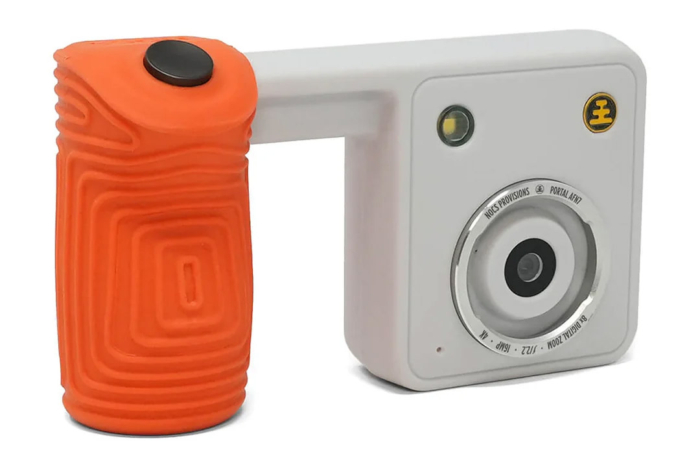
NOCS Provisions, a brand known for its price-conscious yet quality binoculars and monoculars, has just released its Portal AFN7 Adventure Camera. Competing with old point-and-shoot cameras found in backpacks and junk drawers, as well as new brands like Camp Snap, the Portal can take 16-megapixel photos and shoot 4K videos, but the quality evokes ’90s birthday party.
Despite capitalizing on disposable camera nostalgia, it’s a digital camera. It has 4GB of onboard memory that is expandable to 128GB, allowing it to capture up to 2,000 photos or 180 minutes of continuous video on a single charge.
Unlike cheap digital point-and-shoot cameras, however, there are no complicated menus, nothing to adjust besides a few preset filter options. You just snap and pray, just like the old disposables.
My kids and I had the chance to use the Portal all summer and had a ton of fun with it. It won’t replace their iPhones as their primary camera, but I enjoyed using a camera without a screen. It required me to review the pictures later and actually relive those moments instead of forgetting them forever in the iCloud.
In short: Somewhere between smartphone camera and professional-grade DSLR lies the NOCS Provisions Portal. The lightweight, simple design lets you document while staying in the moment, for just $180.
Specifications
Pros & Cons
Pros
- Rugged build ready for the elements
- Easy to use
- Expandable memory
- Long battery life
- USB-C charging and transferring
Cons
- You’re going to need tweezers to get the memory card out
- I don’t think the filters are necessary (but I don’t hate them)
NOCS Provisions Portal AFN7 Review
Design & Features

Its unique trigger shape is meant to let you take photos and videos with one hand, and it uses a digital viewfinder to help you zero in on what you want to capture. Its IP56 rating allows you to use the Portal without worry in all weather conditions.
When it is wet out there, the handle provides plenty of grip, and the wrist leash provides added peace of mind. However, if you do drop it, the Toughwave impact-absorbing housing will protect it from bumps and bruises.
The 16-megapixel camera has a fixed f-stop of 2.2, which is good for most settings. It lets a lot of light into the sensor to aid in low-light photography and video, and performs really well with both depth-of-field shots — where you want to focus in on a main subject — and large landscape shots. The camera is also capable of taking smooth, 4K video.
The camera also has fixed focus, much like point-and-shoot cameras of yesteryear. Coupled with a 22.5mm focal length (35mm equivalent), it gives a slightly wide-angle look at the world. It does offer 8x digital zoom and is compatible with NOCS binoculars. More on this later.
With 4GB of onboard memory, you can capture around 700 photos, 5 minutes of video, or a mix of both. If you need more memory, the Portal can handle up to a 128GB microSD card.
Regarding the battery, you can expect it to last for up to 2,000 photos or 180 minutes of continuous video (with a larger memory card, of course). To recharge, plug the Portal in with its USB-C cable to fully charge in under two hours.
Why Now?

Gen Z and, to some extent, Gen Alpha, brought CDs and old home gaming consoles back. And they’re spearheading this whole thing with point-and-shoot cameras. These two generations were born into a society with the pedal to the metal in terms of how quickly technology was advancing around them.
All of these resurrections are something Gen X and the Millennials took for granted.
So, why now? Why not! There’s never been a better time than right now to experience something different. Especially something from the past that was such a mainstay in our day-to-day lives.
Unrefined At Best

The benefit of using a smartphone for your picture-taking is that you can create the perfect picture on the spot. However, if you’re like me and take pictures for business and pleasure multiple times a day, you end up with hard drives, memory sticks, and Google drives full of photos.
When using the Portal, there’s no screen or editing tools (but there are some preinstalled filters). This means you’re likely to take a lot of pictures that you’ll end up deleting. And that is totally okay. In fact, that’s what photography is supposed to be all about. The beauty here is that you’re not taking away from the experience you’re photographing while it’s happening.
So, expect some blurry shots. Also, don’t expect to see the results of any of the 7 preset filters you’ve used until you’re tethered to your laptop and reviewing what you’ve captured. Speaking from experience, that, in itself, is pretty great.
Pairing With Your Favorite Binocular or Monocular

Included with the Portal camera is a NocDoc. This piece twists onto the bezel on the front of the lens and allows you to dock it to the eyecup on binoculars or monoculars. This lets you go way beyond the Portal’s 8x digital zoom and really get into some far-off nooks and crannies.
The secondary benefit of the NocDoc is that there is no secure connection between it and the looking glass. It only secures to the Portal itself, keeping you moving right along. This allows you to switch back to using the camera on its own without removing or converting anything. In fact, leaving the NocDoc in place can reduce glare on a sunny day.
Though it’s intended to work with NOCS products, the NocDoc has a series of bevels that will allow it to work with a wide variety of glassing products out there. That said, I paired mine with the NOCS Zero Tube 10 x 25 and attempted to capture our resident Great Blue Heron. Unfortunately, as has been the case, he’s a little too fast for me.
In The Field

To get a real feel for what the Portal can do, I took pictures here, there, and everywhere. My house is dark, so I made sure to take plenty of pictures there, with and without the flash. I also made sure to switch between single-subject photos (though I love taking pictures of the dog) and large landscapes.
My conclusion is that this camera performs just like its predecessors. You’ll get blurry pictures, and you WILL need the flash in low-light settings. However, the image quality is fantastic. We’re all spoiled by 48-megapixel cameras, but 16 megapixels does the job really well.
I took the best pictures in well-lit places, and I really enjoyed taking pictures of landscapes, larger items, or groups of things – myself, the dog, etc. This is not a selfie camera, for sure.
My Portal was an early, but finished version. Its NocDoc was 3D printed, and the casing was not IP-rated. Also, it came without instructions, so I had to learn how to navigate the menu (wicked easy) and had to rely on some intuition to switch from taking pictures to taking video (just hold down the shutter button). For someone flying blind, I had no issues using the Portal on the fly – learning as I went.
Regarding the settings, you have the capability of changing the aspect ratio, adding or removing the time stamp and NOCS logo, as well as turning off the sounds the camera makes, and choosing a filter – all by using the button under the digital read-out screen and the shutter button.
One thing I did notice, and this isn’t uncommon, is that the farther out you push the 8x digital zoom, the less detail you’ll get. This won’t be an issue when taking pictures of large objects and landscapes, but in editing, if you want to zoom in and crop, the combination of being zoomed in and working with only 16 megapixels will limit the amount of detail you get.
Transferring Data

Aside from the fact that the Portal will not sync with my MacBook via the USB-C cable, it does sync with a Windows-based computer and my iPhone. You can also remove the microSD card and use it with any sort of card reader or adapter (which is my workaround for my MacBook).
I think the transfer from the Portal to the iPhone is the bee’s knees. You plug the USB-C cable into each port, and the pictures from the Portal appear in your Files folder on the iPhone. From there, you can move them to your photo library and edit and select them there.
One additional Easter Egg I really like is that if you use any filters, the filter name appears in the file name. So, there’s no guessing as to what’s what when you go back later and review the images you captured.
Competition
To be clear, the NOCS Portal packs in a nostalgic “cool factor’ in spades. But when it comes to point-and-shoot digital cameras, there are both downsides and plenty of competitors on the market.
First, the competition, the foremost being Camp Snap. The brand makes digital point-and-shoot cameras packed with nostalgia for $70 and up. It even makes a “digital video camcorder” that will trigger Clark Griswold flashbacks in Gen X. If you’re in this market, check out Camp Snap for very direct comparisons.
Or, you can get similar performance with fewer vibes for $100. Look at the Kodak PixPro, which has similar specs and a screen, or even something like the Instax Mini 12, which prints out physical photos much like an old-school Polaroid (another great option).
For the same price ($180), you can get a Kodak PixPro WPZ2, an actual waterproof camera capable of snorkeling or diving underwater up to 50 feet. Or for $180, Minolta offers the MNZ3X Digital Camera, which has much more robust controls, including the ability to focus, a 24-75mm lens with 3x optical zoom, and an articulating screen.
Finally, the downsides — expect the quality to measure up to, as we mentioned, a ’90s birthday party. For the money, it’s pretty good. The filters are super fun. The responsiveness is quick. Just don’t expect this camera to measure up to a high-end camera or even a modern phone.
In the end, the Portal is a camera with a little novelty baked in. It takes pictures that remind you of your childhood with a quality that vibes with social media trends.
In Conclusion: Who Should Buy the Portal and Why

The Portal allows you to capture the moment without stepping away from it. When using your phone’s camera – or even a standard digital camera – you need to take time to set up your shot; the Portal allows you to shoot from the hip. There is no setup involved – you just line up your subject in the digital viewfinder and click the shutter button. In fact, the biggest decision you’re going to have to make is whether to have the flash on or not.
That said, this camera is for the person who wants to keep moving. It’s for those times on a hike when something catches your eye, so zero in and snap the shot, without skipping a beat. It’s for blowing out birthday candles and opening Christmas gifts, just as much as it is for you to take some time, later in the day, to go over all the moments you captured.
Overall, as far as I am concerned, the Portal is equal parts nostalgia and authenticity. Don’t get me wrong, I love taking pictures with my iPhone. But there is a deeper skill set you can hone with photography by learning the tricks of the trade. Smartphones adjust to light and focus; cameras like the Portal require a little more insight. No, there’s no real learning curve here, but you’re in control of the entire experience – so spending time with it will make you a better photographer overall.